

There are great tools to support strategic portfolio management in the markets with advanced portfolio management and visualization capabilities. Portfolio management tool helps to create transparency across organization – business and technology units, finance, and support functions. When development work is needed from many organization units, such as different business teams and functions, IT and R&D and external vendors, managing the big picture via clear roadmaps helps a lot. Furthermore, having a common tool for managing portfolio finances supports financial planning and helps to create visibility on costs and benefits.
However, tool alone does not solve everything, and there are few things to look into before actually starting tool implementation. Here are couple of key learnings what to do from the buyer organization viewpoint, before kick starting actual tool development!
Have a look! If you have other tips to add, I would love to hear from you!
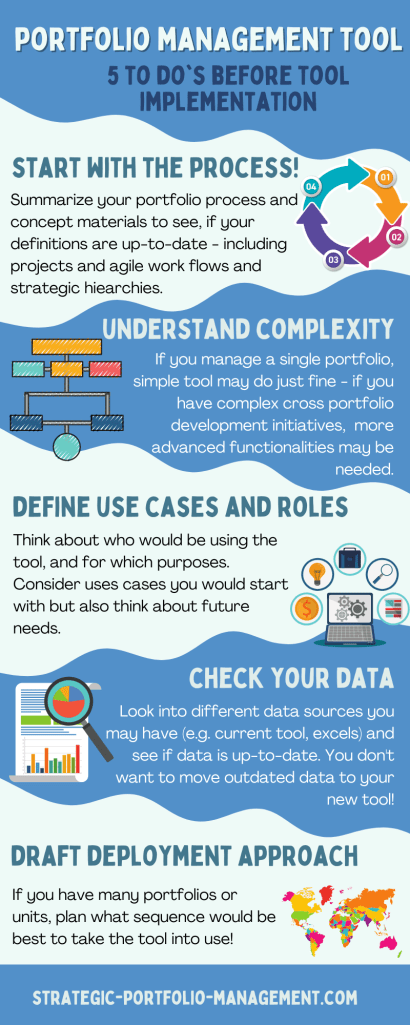
1. Start with the process!
Before initiating your tooling project, it is good to go through your key process steps. Here is a simple checklist:
- Do you have a common process defined for your portfolio or across organization? Process can (and should) be simple, but it is needed to setup the tool for you.
- What are the phases and gates for your projects – do you have one model or several?
- Do you have agile work or continuous development – do they follow for example portfolio kanban process?
- If you have an existing process, what is the feedback from the practitioners? Can you simplify your process? Are all project gates still actively used?
- Do you have a defined portfolio structures (e.g. portfolios, sub portfolios, programs or other strategic structures)? If not, it is good to check the needs with different portfolios. This step may require some iterations, if tool has not previously been used.
- What are your financial portfolio cycles, e.g. yearly, quarterly or monthly? How do you want to follow up financials?
Note! Even though it is important to work on process, one should not get stuck with process definition details – basic definition is enough, and details should be also checked while implementing the tool, as each tool has some unique features – sometimes also impacting process.
2. Understand complexity & portfolio structures – one portfolio or multiple portfolios with complex dependencies?
Complexity of portfolios varies a lot from company to another. Large corporations may need to manage many different types of portfolios or manage the same data from different viewpoints (see linked post Development portfolios in large companies – what is your viewpoint?).
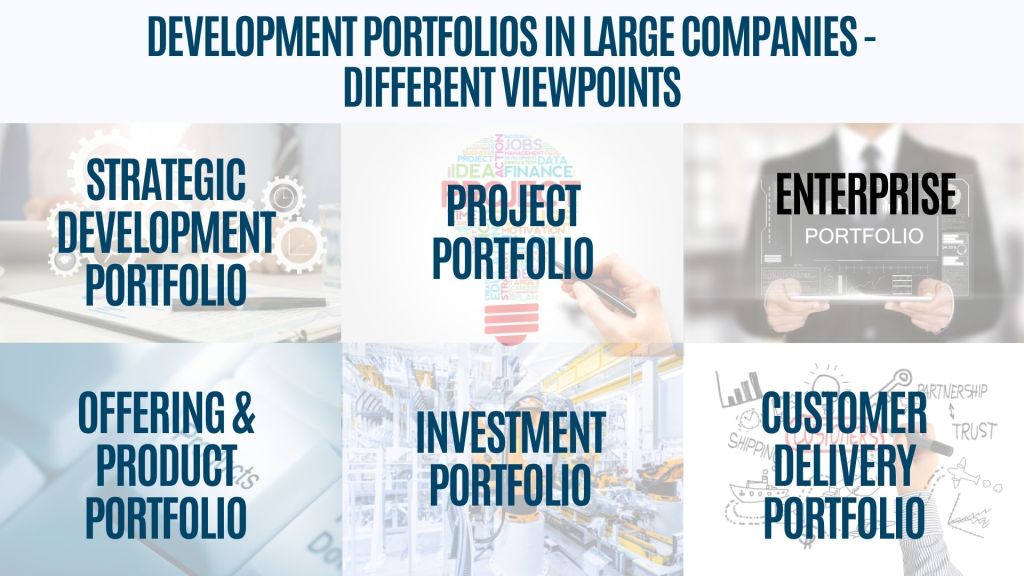
Thus, it is good to align on scope and structures at the beginning of the work! Here are couple of questions to look into:
- What is the scope of your portfolios to be implemented – do you include business and IT development, R&D, customer delivery portfolios, product portfolios, innovation portfolios etc.?
- Do you implement tool for a single portfolio or across the whole company? Do you need to look into enterprise view, too?
- If you manage a single project portfolio, a simple and cost-efficient tool works well. If you operate in a large corporation, where you have many portfolios and work is executed by many different units, more advanced features may be needed.
3. Define use cases & roles – what tool capabilities do you need?
Different tools have a huge variety of functionalities, and one gets easily overwhelmed by all the possibilities.
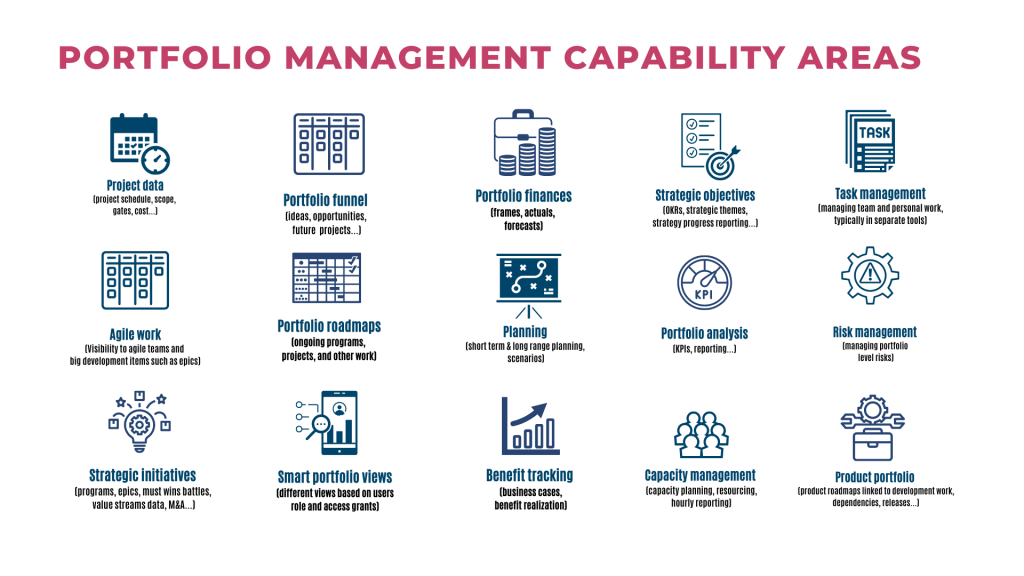
What tooling capabilities are you looking for?
As each of the tool capability requires also some deployment effort, good practice is to start with a prioritized set of capabilities – Minimum viable product. What are the key capabilities tool should support with?
On the other hand, when implementing the new tool, it is good to look into future needs as well, so that tool also has capabilities to support more extensive use. Typically, these capabilities could be more extensive integrations, product or application portfolio management, scenario planning, and more sophisticated functionalities related to strategic objectives. To give you some inspiration, you can use the below picture to prioritize and sequence your tool planning:
Define user roles
Another important step during the planning phase is to define user roles – who would be actually using the tool – which roles would update the data and which roles would need transparency? Sometimes it may make sense to start with a small group of heavy users, e.g. introduce the tool for portfolio and project managers only, and then extend the use for a wider group of people. Here is the checklist:
- Define user roles for the tool (e.g. portfolio managers, program managers, project managers, finance controllers, line managers; owners, sponsor and leadership roles; how about team members for hourly reporting?)
- Think also about user groups, who would need transparency to portfolio roadmaps even though not actively editing the data (e.g. portfolio owners, business and technology leaders)
- Do not forget key user and admin roles!
- Good to do also a rough estimation of how many users would belong to different user groups – this may be helpful for the tool license discussions.
Define use cases
Based on the tooling capabilities and user roles, what are the use cases you would like to get started with? Few questions to think about:
- Define use cases – what are the important use cases you need to get started with?
- Identify also use cases, which might be useful for the future, but you do not need them right away (for example future needs to integrate the tool to other systems)
- Remember to get inputs also for technical things, like access management, configuration and tool maintenance from your IT partners
4. Check your data!
Before tooling implementation, it is good time to check what data you have. The approach is a bit different, if you are replacing an existing tool to a new one, when compared to a situation, where portfolio data may be in different excels and may lack common field definitions. Here are couple to things to consider:
- Where is your data? In an old tool or multiple tools, or in different places such as excel sheets? Or do you need to start by collecting the data into once place?
- Do you have similar data available across portfolio or across portfolios or does each portfolio have different data sets?
- Do you have relevant data gathered? This is a good time to see, if all current data fields are relevant and meaningful.
- Is your data up to date? This is a good time to update data, before new tool setup!
- Are you able to consolidate all available data to excel or other format for migration purposes?
- Are roles clear – who is responsible for portfolio data in each organization or portfolio? Tool will not help, if no-one is updating portfolio data.
Check out also other blog text related to Portfolio data – 5 tips from practitioners!
5. Draft your deployment approach
In addition to technical tool implementation, organizational change management, training and alignment plays a key role when implementing common tools across enterprise. You may want to avoid big bang type of deployment, if possible.
- Do you have pilot portfolios you would start with?
- Can you sequence other portfolios based on the interest and urgency?
- Which user groups and roles would need trainings?
- Would you create modular training materials or videos, which would be available also for new team members in the future?
- How about change management? If the way of working is changing, line managers may need strong support during the implementation phase.
Bonus tip – learn about tool concepts
There are plenty of great portfolio management tools full of interesting functionalities! Before you initiate your project, get familiar with the tool concepts, how they work and how they would support your needs. Tool data models may also bring really great possibilities for you to create transparency across organization or sometimes include some limitations. If possible, look for videos, demo to try the tool out or create a proof of concept!
Here are links to some of the portfolio management tools I have used or got familiar with:
Also for example JIRA has been used successfully to connect development work to portfolios.
If your favorite tool is missing for the list, I would be happy learn more and to add it here!
Check out also Gartner Strategic Portfolio Management reviews and rating!
 Strategic Portfolio Management